
The team at Leverage Technologies has recently implemented SAP Business One 9.1 HANA, and the functional capabilities are incredible. In modern business, we are constantly dealing with big data, making quick, easy to access information essential. Professionals require instant analytics where and when they want them, and SAP Business One 9.1 HANA provides the ideal solution. The platform features an advanced, role based cockpit view that gives users the power to embed HTML5 widgets, track live KPIs, view recent system updates, interact with structured workbenches, and much more.
Designing Your Role Based Cockpit View
With the correct user authorizations, individuals can fully customize and create their own role based cockpit views in SAP Business One 9.1 HANA. This allows you to arrange personal KPIs, interactive charts, and specific operational widgets to match your daily workflow. Alternatively, users can choose from several standard, out of the box SAP cockpit layouts built for specific departments, including Sales, Purchasing, Finance, and Inventory.
System administrators can also assign employees to specific permission groups, such as the sales division. This group assignment automatically grants the entire team immediate access to a unified pool of relevant sales widgets and target KPIs, ensuring everyone works from a single source of truth.
SAP Business One 9.1 HANA Cockpit – KPI’s, widgets and dashboard reporting:

Core Analytical Components of the HANA Cockpit
The modern HANA platform introduces several innovative features designed to accelerate data discovery and streamline daily transaction management:
1. Enterprise Search
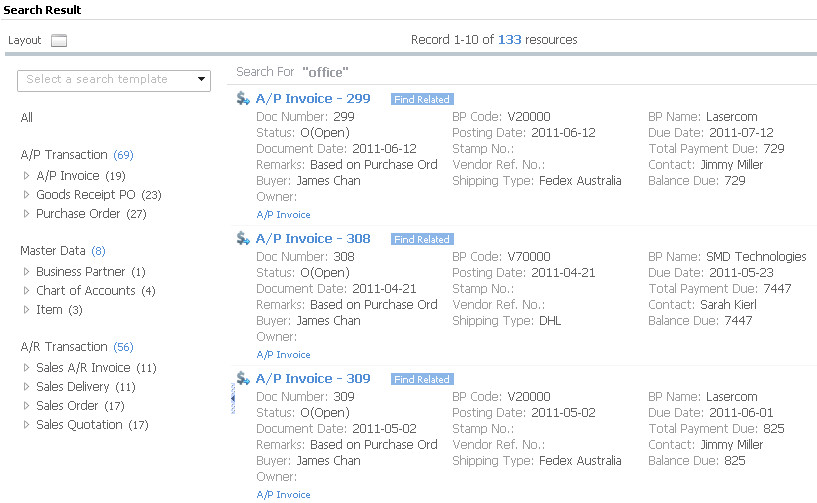
The SAP Business One 9.1 HANA enterprise search gives users a highly efficient way to locate critical data at the click of a button. This tool allows you to search the entire SAP database for specific source documents, master data, and related contact information simultaneously. Leveraging advanced in memory database technology, the engine scans massive data volumes to return precise results in milliseconds. Users can also save frequent search configurations by creating personalized templates for future use.
SAP Business One 9.1 HANA – Enterprise search made easy:
2. The HANA Workbench
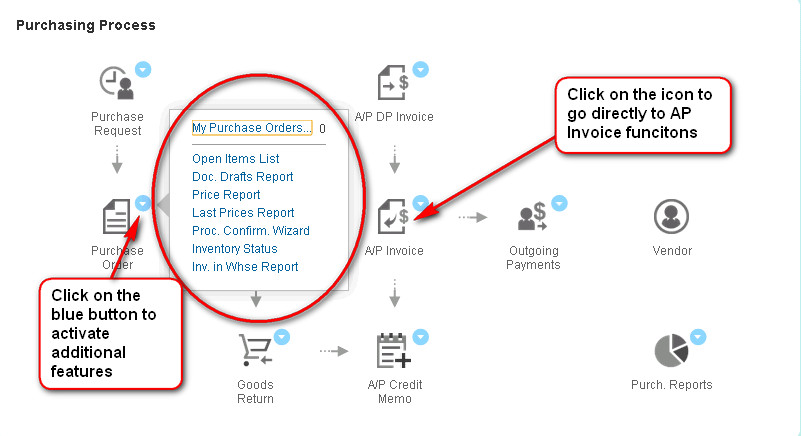
The workbench module provides a standardized visual map to guide users through key business processes. Rather than navigating complex drop down menus, a user can simply click on graphical icons to open specific transaction windows directly from the workbench layout.
Additionally, clicking on the context menu icons (represented by a blue dot) launches immediate actions to help complete daily tasks. For instance, clicking the blue context dot next to the purchase order function gives you direct access to open items lists, document drafts reports, general price lists, last prices reports, and live inventory status overviews.
SAP Business One 9.1 HANA Workbench – workflow made easy:
3. My Recent Updates
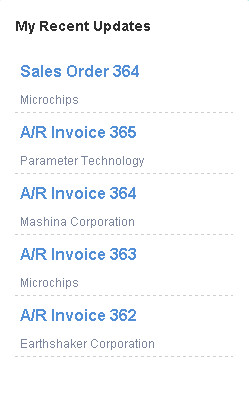
This function provides a live snapshot of recently modified ledger accounts, customer credit adjustments, and newly added marketing documents. Users can perform an immediate drill down into any listed transaction by clicking on the document line. For example, clicking on a listed sales order item will instantly open that exact sales order record on your screen. A user can drill down to their recent updates by clicking on the item or document. As an example (seen below) clicking on sales order 364 will drill you down to sales order 364.
4. Custom Count Widgets
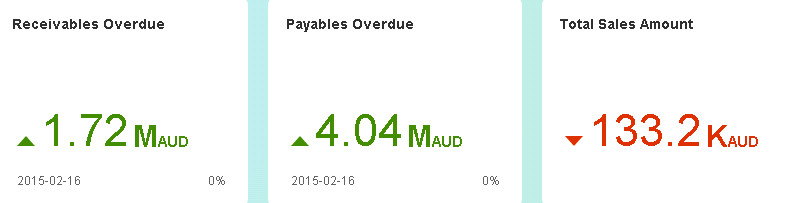
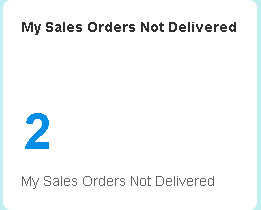
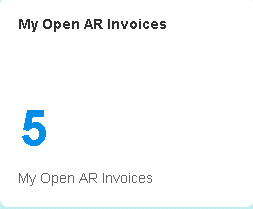
Count widgets display a real time tally of records returned from specific database queries. This is incredibly useful for tracking high value customers, open accounts receivable invoices, undelivered sales orders, unreceived purchase orders, or pending inventory transfer requests.
You can personalize the cockpit by adding, removing, or creating count widgets that fit your unique information needs. Setting up a custom counter is straightforward: navigate to Tools, select Cockpit, open the Count Widget setup window, and choose your preferred user defined query.
SAP Business One 9.1 HANA Widgets:
 |
 |
Building Indicators with Pervasive Analytics
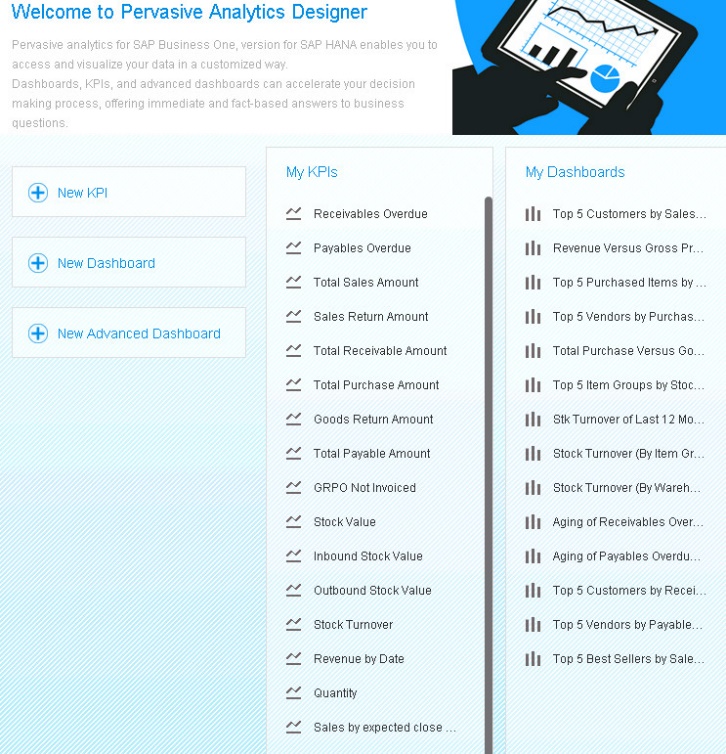
Key Performance Indicators make daily operations much simpler by providing instant access to vital fiscal and logistical data. Users can design and deploy their own custom KPI indicators utilizing the built in Pervasive Analytics Designer. This intuitive design suite allows managers to define financial and operational metrics that precisely reflect their unique corporate goals.
SAP Business One 9.1 HANA provides a rich library of pre designed KPI widgets that can be dropped into your HTML cockpit. Examples of these standard widgets include:
-
Total accounts payables amount due metrics.
-
Top five customers ranked by total sales volume.
-
Top five highest performing item groups.
-
Live inventory turnover and manufacturing yield rates.
In summary, if you want high speed reporting, interactive dashboard widgets, and responsive KPIs that give your team immediate access to actionable insights, SAP Business One HANA delivers the ideal foundation for better business decision making.
SAP Business One 9.1 HANA – Pervasive Analytics:
Watch the Live Software Demonstration
Discover how in memory computing can transform your data analysis. Watch our detailed video walkthrough highlighting the cockpit interface, custom widget design, and advanced enterprise search capabilities in action:
SAP Business One 9.1 HANA Demo:
Recognised by the top ERP Partners in Australia



Leverage Technologies is an SAP Gold Partner, Sage Platinum Partner, and MYOB Acumatica Platinum Partner. Our award-winning team has earned national recognition for excellence in ERP and our commitment to customer success.

Brett has more than 20 years of business software sales and company management experience. Brett has been involved in more than 300 ERP projects. His passion is customer satisfaction, making sure every client is more than just satisfied. Brett wants our customers to be driven to refer their friends and peers because we offer the best services and technology available and because we exceeded their expectations.